Of all the production roles that go into an e-learning course, screen recording sounds like the simplest. Open the screen capture tool, walk through the software, narrate as you go, save the file. The output is what almost every team produces on the first attempt. It is also almost always the part that gets sent back for re-recording, because the gap between a screencast that captures a process and one that actually teaches it is bigger than it appears.
A screencast is not a recording of someone using software. It is a guided visual explanation that takes a learner through a process step by step, at a pace they can follow, with the right emphasis at the moments that matter, and with enough context that the learner understands not just what is being done but why. Producing this version of a screencast requires a distinct skill that has very little to do with knowing the software, which is why subject matter experts who know the tool deeply still produce screencasts that learners cannot follow.
Why DIY screencasts almost always need to be redone
The pattern is consistent. A subject matter expert is given a screen capture tool and asked to record themselves performing the process being taught. They proceed at the pace they naturally work at, which is significantly faster than a learner can follow. They click through menus efficiently because they know where everything is. They use keyboard shortcuts that the learner has not yet seen and does not know exist. They narrate what they are doing in the moment, but the narration is descriptive rather than instructional: "now I am clicking here, and then I am going to the file menu" rather than "to get to the export settings, we need to open the file menu, which is at the top left of the screen."
The result is a recording that accurately shows the expert performing the task and does not teach the task to anyone who does not already know it. The cursor moves too fast for the learner's eye to follow. The reasoning behind each step is not made explicit. The moments where the learner is most likely to make a mistake are not flagged. The screencast feels like watching someone work, not like being shown how to do something.
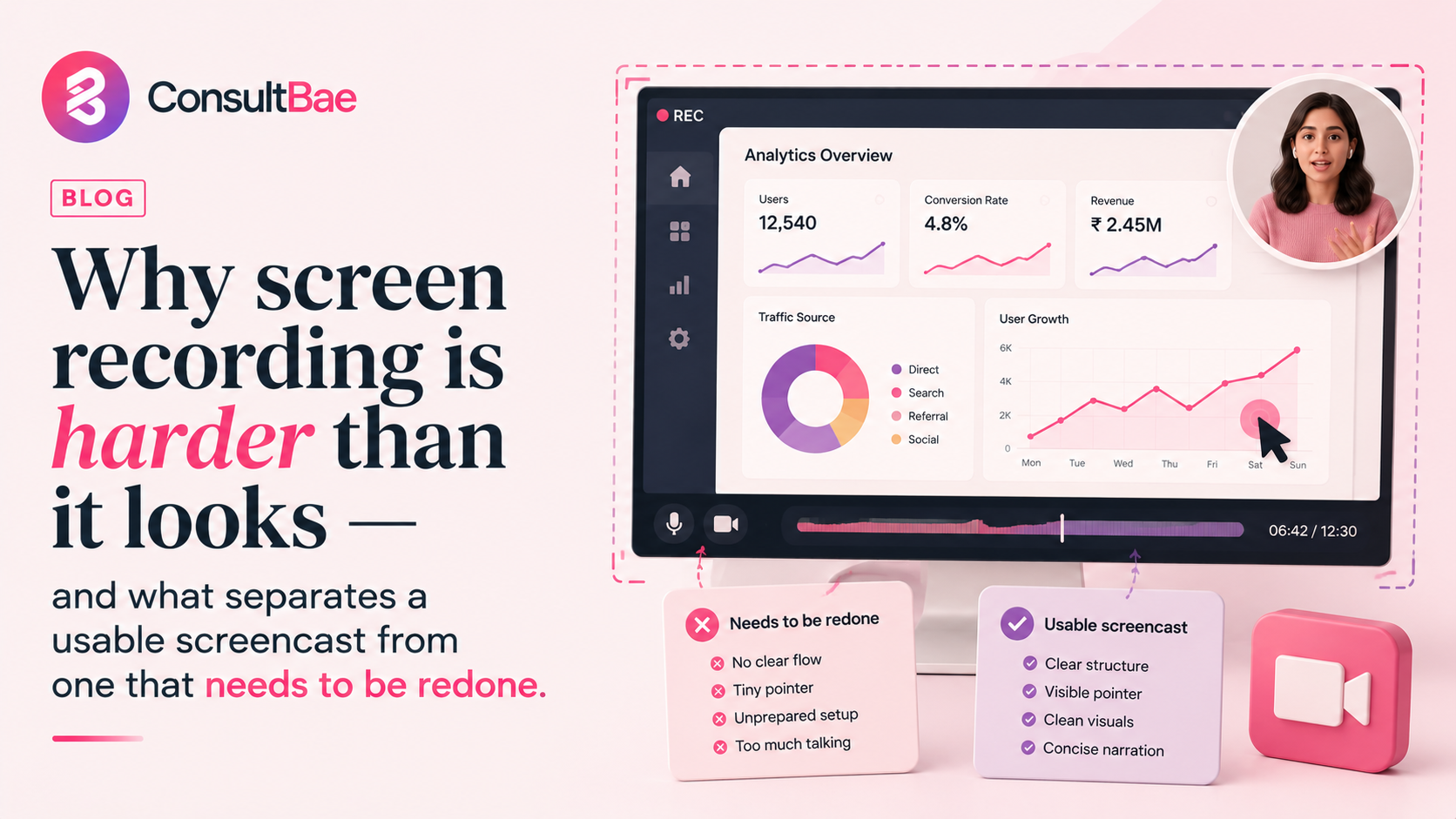
The four things that separate a usable screencast from one that needs redoing
A few specific decisions distinguish screencasts that actually teach from screencasts that get sent back for revision.
Cursor pacing. The cursor needs to move at a pace the learner can follow with their eyes, not the pace the operator naturally works at. This usually means moving more slowly and deliberately than feels natural, with brief pauses at decision points where the learner needs time to absorb where they are. Fast cursor movement is the single most common reason screencasts have to be redone, because once the learner has lost track of where the action is happening, the rest of the recording is no longer teaching them.
Narration scripting. Good screencast narration is scripted in advance and read against the action, not improvised. Improvised narration tends to be descriptive ("now I am opening this") rather than instructional ("to perform this task you need to open this menu, which is here"). The difference is whether the narration is telling the learner what is happening or telling them how to do it themselves. The instructional version requires planning that improvised narration cannot deliver.
Resolution and format. The screencast has to be captured at the resolution and format the delivery platform requires, with the on-screen elements at sizes the learner can read without straining. A recording made at the operator's native resolution often produces output where text, menus, and indicators are too small to be legible on the platforms learners will actually watch on. Catching this at recording time avoids the entire screencast being unusable.
Structural breaks where the learner can absorb. A continuous screencast that runs for fifteen minutes without pause asks the learner to absorb the entire process in one sitting, which most learners cannot do effectively. Built-in pauses, section breaks, and explicit moments where the narration pauses to let the action settle give the learner places to process what they have just seen. These pauses are uncomfortable for the operator to leave in, which is why they often get cut, but they are what makes the screencast watchable.
Knowing the software is not the same as being able to teach it on screen. A screencast specialist makes the gap between knowing and teaching visible, and closes it deliberately.
Why this is a distinct skill from subject matter expertise
Subject matter expertise gives someone the ability to perform a process correctly. Screencast production requires the ability to perform that process in a way someone else can learn from. These are different skills, and one does not automatically include the other. A deeply experienced software user can produce a screencast that is technically accurate and pedagogically useless, because the things they have automated through years of practice are exactly the things a learner needs explained.
A screencast specialist brings a different orientation to the recording. They think about the learner watching it before they think about the action being recorded. They plan the narration to address questions the learner will have, not just to describe what is happening. They control the pace of the action to match what the learner can follow. The output is a teaching artefact, not a documentation of a task.
What a properly produced screencast actually looks like
The screencasts that work well share a few features that distinguish them from the average corporate training output. They were planned before they were recorded, with a script and a defined structure rather than improvised in front of the screen. The cursor pacing was deliberately slowed to match the learner's ability to follow. The narration was scripted to be instructional rather than descriptive, and was rehearsed before final recording. The resolution and format were set up correctly before the first take rather than discovered to be wrong afterwards.
All of this is more operationally heavy than turning on screen capture and recording, but the result is screencasts that learners can actually use, which means the course they appear in produces capability rather than just completion.
Cursor pacing deliberately slowed for the learner to follow. Narration scripted and rehearsed in advance, focused on how the learner should perform the action rather than what is being shown. Resolution and format verified against the delivery platform before recording. Structural breaks and pauses built in to let the learner absorb. Common mistake points flagged explicitly in the narration. The whole screencast watched back from a learner's perspective before being signed off as final.
How ConsultBae handles this
Screen recording is one of the five distinct production roles ConsultBae provides as part of end-to-end course production. The work is done by specialists whose job is screencast production specifically, not by the subject matter expert who knows the software. The expert reviews and approves the output. The recording is done by someone whose entire focus is making it watchable for the learner.
Most e-learning courses underestimate how much production skill goes into a usable screencast. The format looks simple, the tools are accessible, the temptation to just have the expert do it is strong. The result is recordings that get sent back for revision, that frustrate learners, or that get shipped despite not working because the timeline ran out. The version that works is harder to produce. It is also the version that actually teaches.
Shivani Agarwal leads the E-Learning vertical at ConsultBae, overseeing end-to-end course production across technology and non-technology domains.
Producing technical training that needs screencasts that work?
ConsultBae has dedicated screencast specialists as one of the five production roles in our e-learning vertical. Let us talk.
Talk to us